The Cropped Photograph That Tells Too Much
Learn how to check a cropped photograph’s source, compare wider versions, and describe what it can—and cannot—show before you share it.
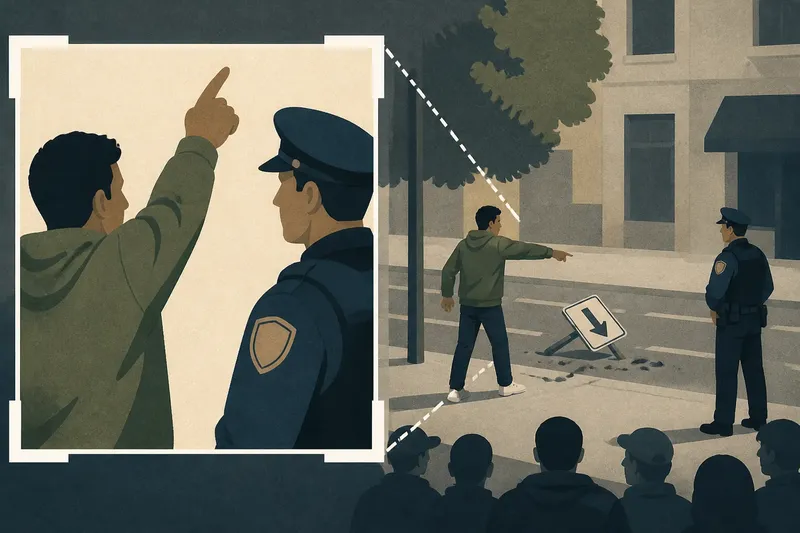
A cropped photograph can make a quiet scene look confrontational without changing anything inside the frame. When a cropped photograph appears in a news post, its edges shape the story: they determine which people and objects you can see, and which relationships remain outside the picture.
Cropping is not automatically deceptive. Editors may frame an image to fit a page or draw attention to a subject. The useful question is whether the crop removes details that matter to the caption, and whether another source can clarify what the photograph leaves out.
Describe the visible scene before interpreting it
Set the caption aside briefly and name what is visibly present: people, objects, gestures, signs, and the apparent setting. “A person raises an arm beside an officer” describes the frame. “A person attacks an officer” adds an action and relationship the photograph may not establish.
Look along each edge. Is someone partly cut off? Does a gesture seem directed toward a person outside the frame? Are there fragments of a sign, vehicle, doorway, or crowd that suggest a larger scene? These details can point to useful questions, but they do not answer them by themselves.
Even an uncropped photograph records one direction at one moment. It cannot show what happened before the shutter, what followed, or what stood behind the photographer. Treat the frame as a visual record of a moment, not a complete account of an event.
Check the photograph promptly, without waiting for a schedule
There is no need to spread image checking across a week. A simple order can help you avoid being steered by a caption, but use it as an optional sequence you can complete as time allows—not as a reason to postpone a decision or a useful update. If a post concerns an immediate safety issue, consult relevant official channels and reputable local reporting promptly.
- Check the post: Note the exact caption and identify what it claims. If the image itself does not show the claimed action, describe only the visible details while you check further; otherwise, continue tracing the image and claim.
- Check the credit: Look for a named photographer, news organization, agency, date, or location. If those details are absent, treat the post’s provenance as unclear and search for an attributable source; if they are present, verify that source’s account rather than relying on the credit alone.
- Check for other versions: Search for a wider frame or another image from the same moment. If the framing changes who or what appears connected, account for that difference in your description; if no alternate appears, do not treat its absence as confirmation.
- Check independent accounts: Look for reliable reporting or a direct record addressing the same event. If it supports the caption, you can say the image is consistent with that reporting; if it conflicts or says less, preserve that distinction.
- Check your wording before sharing: Compare each phrase with what the image and reliable sources support. If a phrase asserts an unseen motive, sequence, or action, remove it or attribute it to a source; if the wording stays within the evidence, share it with any remaining uncertainty stated plainly.
- Check whether speed matters: Decide whether the post relates to an urgent public safety update. If it does, consult appropriate official information and reputable local coverage now; if it does not, take the time needed to check the source and framing before sharing.
Say you see a tightly framed photo of a person raising an arm beside a police officer, captioned as an attack. You search the distinctive caption words with the likely location, then use Google Lens and TinEye to look for other versions. Suppose you find a wider frame showing the person pointing toward a fallen sign while the officer stands several steps away. You compare the matching clothing and sign, check the photographer’s caption, and look for independent reporting; if none establishes what happened before or after the shot, your resulting description can note the visible pointing gesture and say the attack claim is not established by the image. The wider view changes the reading of the frame, but does not settle the event’s sequence.
Trace image versions without mistaking search results for proof
Reverse image search can locate other appearances of a photograph. Google Lens and TinEye may surface an earlier upload, a less tightly cropped version, or reporting that identifies the scene. Treat results as leads: an old image can be reposted with a new caption, and the first result is not necessarily the original source.
Compare versions using details such as clothing folds, signs, shadows, building features, and the positions of people. A matching wider image can show what the crop excluded. It cannot, on its own, establish when or where the photograph was taken.
Search distinctive caption wording alongside a likely place name or event description. If a photographer or agency is named, check whether its own caption supplies a date, location, and note about cropping. A credit can help trace provenance, but it does not make every caption attached to the image authoritative.
Ask what the crop changes before drawing a conclusion?
Does a wider version prove the caption is false?
No. It may reveal omitted context or make a confident caption look incomplete, but it may not establish what happened before or after the photograph. Check whether reliable reporting supports a more specific interpretation.
Can the caption establish the location and date?
A caption can state those details, but they are claims about the image, not details necessarily visible in it. Look for an attributable source or corroborating account that connects the photograph to that place and time.
Does cropping show that an image was manipulated?
No. Cropping is a routine editorial choice, and the frame alone does not reveal why it was made. Ask whether the omitted area materially changes the meaning of the caption.
What if no wider image appears?
Say what the available image visibly shows and note which context remains unclear. Not finding a wider version neither confirms the caption nor disproves it.
Describe the photograph at the level its frame supports
A crop can change apparent distance, scale, direction, and emphasis. Removing empty space may make a group seem more tightly packed; excluding a nearby object may make a gesture look aimed at someone else. These effects arise from framing, even when no pictured detail has been altered.
A wider frame may clarify who or what is nearby, but it still cannot settle motive, sequence, or sound. Nor is every omission evidence of concealment: a short crop may simply fit a layout. What matters is whether the framing materially affects the claim made about the scene.
It is not worth spending an evening trying to infer a person’s motive from a frozen gesture or identify every object beyond a blurry edge. Those efforts can give weak clues more weight than they deserve. Spend your attention tracing the source, comparing available frames, and checking whether the caption’s central claim has support beyond the photograph.
For a cropped photograph, the most useful final check is often a wording check: does each sentence describe the image, attribute an interpretation to its source, or claim something the frame cannot establish? That distinction lets a photograph remain informative without asking its borders to tell the whole story.